Description
Product Description
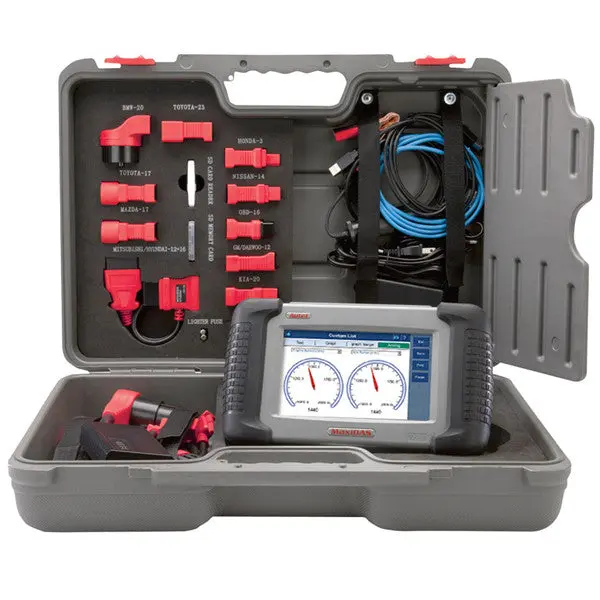
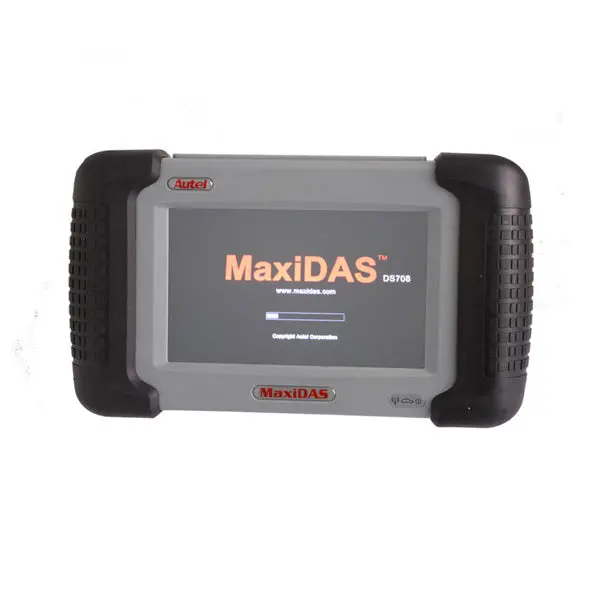
Autel MaxiDAS DS708 is ingeniously designed to recreate the functionality of the tools used by automotive manufacturers’ dealers, empowering independent garage shops to provide complete servicing in their own shops, including data stream, reading and clearing of diagnostic trouble codes, component activation and immobilizer key coding, etc.
Original Autel MaxiDAS® DS708 Russian+English Version
Top 5 Reason to Get Autel MaxiDAS® DS708 Russian+English Version:
1. Language: Russian(if you need English,we can add it for you with your serial number)
2. Original from Autel, One Year Free Update Online
3. Support 12V Petrol and Diesel Vehicles
4. Wifi Support
5. Support Multi-Brand of Cars, One of the Most Powerful Universal Diagnostic Tools How to Update Autel MaxiDAS DS708?
1. DS708 has one CD, firstly install the software in the CD;2. Secondly run the update software, login with username and password.3. Importand note: inser the SD card into computer when updating DS708
To Change Language of Autel DS708,Please Follow Principles Below: 1.It can’t change between English and Spanish 2.You can only apply to change from English or Spanish to other languages ,don’t work in opposite way. Note: can’t change from English to Japanese and Russian 3.can only change language one time Description: the MaxiDAS DS708 is a state-of-art diagnostic system that delivers more accurate, more stable, more comprehensive, easier and faster diagnosis. The new generation platform stands out in a variety of tools by providing incredibly high performance with intuitive operation. Right for the first time, workshops and technicians could find an OE-level diagnostic solution designed for the aftermarket. The DS708 is the key to gain customer confidence and boost your bottom-line. Feature and Function: 1.Extensive vehicle coverage for more than 30 domestic, Asian and European vehicle makes2.Deep vehicle system coverage for ALL electronic systems3.Complete function capability including live data and so many others4.Unparalleled OBDII functionalities supports ALL 5 OBDII protocols and ALL 9 test modes5.Automatic Wi-Fi updates available in new software releases6.Innovative dual-processor technology for quicker diagnostics and boot-up7.The genuine Windows CE operating system allows for more stable performances, better compatibility and expandability8.Internet explorer brings internet resource of your choice at your fingertips9.WIFI internet capability allows for wireless access throughout the workshop10.Advanced USB communication for faster operation and more accurate diagnostics11.Extremely easy-to-us with touch-screen operation and intuitive operation12.Unique shop tough ergonomic design features multi-layered rubber protection and strong housing13.Intelligent memory of vehicles for easy and quick diagnosis of tested vehicles14.Captures, saves and prints screenshots for convenient troubleshooting15.Displays live data in text, graph and analog for easy data review and analysis16.Records and playbacks live data to pinpoint troubles of sensors and components17.Innovative graph merging for easy and quick detection of intermittent problems18.Automatic WIFI Data Logging for quick and accurate technical support and troubleshooting19.Built-in overvoltage protection keeps the instrument and vehicle from unwanted damages20.Creative remote diagnosis for convenient demonstrationand training21.Powered by Autel Uni-SCANTM technology with no need for extra adaptors or “keys”22.Prints out recorded data any time and anywhere with Wi-Fi printing capability Specifications Operating System: Windows CECPU: ARM9+ARM7 dual processorMemory: Max. 4 Gigabyte SD cardCommunication Interface: OBD,USB EthernetInput Voltage: 8.0-32.0V power provided via vehicle batteryPower Consumption: 8WOperating Current: 500mADisplay: Backlit, 7″ TFT (800*480 dpi) color display with touchscreenOperating Temperature: 0 to 60°CStorage Temperature: -10 to 70°COperation: Touchscreen and one rubber key (ON/OFF)Printer Interface: Wi-Fi, USB, EthernetHousing: Strong plastic housing with protective rubber bootProtocols: ISO 9141-2, K/L lins, flashing code, SAE-J1850 VPW, SAE-J1850 PWM, CAN ISO 11898ISO15765-4, High-speed, Middle-speed, Low-speed and Single-wire CANComponent Descriptions1. Main Connection Port Connect to the mains for power supply of updating, printing data logging and internet access after disconnecting from the vehicle.2. USB Connection Port Connect to the computer for updating and printing.3. Diagnostic Socket Provides power supply and connection to the vehicle via diagnostic cables and connectors supplied.4. Internet Connection Port Provides internet access for updating, printing and data logging and brings the internet resource of your choice at your fingertips.5. ON/ OFF Button Powers on/ off the diagnostic tool.Note: The scan tool will not turn off automatically; it stays on until you turn it off.6. LED IndicatorsThe three light-emitting diodes indicate certain system conditions,Communication LED – Green LED light in middle shows when the unit is in service.Wireless LAN activity LED – Green LED light in the left shows when a wireless local area network in enabled, flashes when data is being sent or received.Main Power LED – Red LED light in the right shows when the unit is powered on.7. SD Card SlotThe standard SD (Secure Digital) card slot enables the unit to read and write data to the card inserted in the slot. To use the software, insert the card with the metal contacts facing down and pointing toward the MaxiDAS.Note: Do not force media into the SD card slot. This may damage the SD card slot. To Remove SD Card, press the card again and slot will pop out card automatically.8. Stylus The Stylus is used for typing and selecting. To calibrating Touch Screen, refer to chapter 7 – 8, Calibrating Touch Screen.9. Stand The built- in metal stand allows the unit to rest for hands-free viewing when extended. It is attached to the back of the scan tool and can be secured to the back again unit when not in use.10. Handgrip The handgrips are attached to both sides of the MaxiDAS unit. Hold the handgrips to stabilize the unit while using. The handgrip also eliminates the damage when you drop the tool accidentally.11. MaxiDAS 708 LabelThe Label includes the notice and warning.12. LCD Screen Displays the menus and data screens.Important: Use the supplied stylus or plastic-tipped pens for touch screen display. Do not use pencil, pen or any sharp object on touch screen display.13. Memory CardThe Memory Card contains the tool’s diagnostic software, applications and maximum of 4 Gigabytes storage.Note: Do not remove the memory card while the unit is in service.14. DLC CablesThe DLC (Data Link Connector) Cable is used to connect between the scan tool and vehicle’s DLC. Numbers of cables are provided; select the appropriate one for the vehicle being tested. An optional extension cable may also be used.15. AC Power SupplyThe AC power supply and power cord (12V and 3.33A) is used to power the scan tool from wall socket. Software DescriptionsThis section shows the software which is currently used for the tool.The MaxiDAS software is provided on a SD Memory card and can be updated. Free software updates are available periodically on the Internet at www. maxidas.com. Software Applications OverviewThe software has two main features: perform vehicle component test and provide information that may assist you in understanding the component. Scan Diagnostic ApplicationsTo perform scan diagnostic tests, identify a vehicle you wish to test from the main screen.Following the instruction on each screen that appear to access to the function test. The diagnostic functions varies depend on the type of vehicle. Auto Scan (HONDA) … Chapter 5Diagnostic Trouble Codes…Chapter6Live Data (OBDII) …Chapter 7Freeze Frame …Chapter 8Component Test(OBDII Only) … Chapter 9I/M Readiness (OBDII Only)… Chapter10O2 Mon. Test ( O2 Monitor Test)( OBDII Only)…Chapter11On-Board Mon. Test (OBDII Only) …Chapter 12 PlaybackThe Playback function is used for reviewing saved data files. The data files are saved to the Maxidas’s memory card with the data stream saving function, DTC saving function,freeze frame saving function and the automated testing and diagnostic system.
See Chapter … at Page …for detailsUpdateSetup WIFI Network Unit Date/Time Language Backlight Beep Touch Remote desk About
Explore more from our collection.


Reviews
There are no reviews yet.